Удаление предыдущей фиксации
Перейдите в каталог git-tutorial/tutorial3, который вы скачали ранее.
Если вы изучите журнал этого репозитория, он будет выглядеть следующим образом:
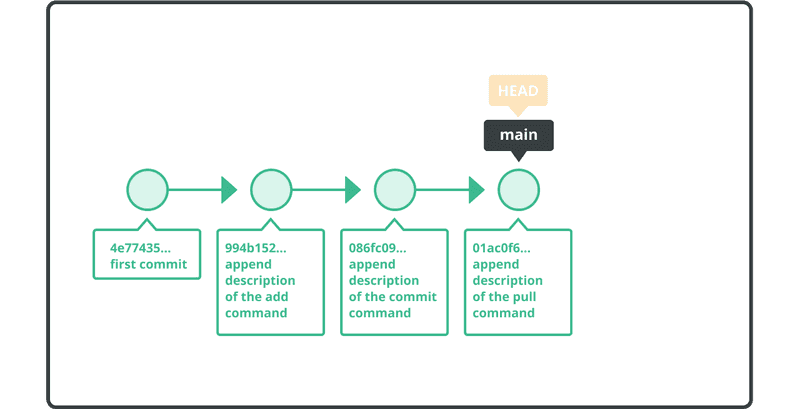
Мы собираемся отменить две предыдущих фиксации, используя команду git reset.
Сначала откройте файл sample.txt и убедитесь, что его содержимое выглядит следующим образом:
Anyone can learn Git with this tutorial and Backlog
add: Register a change in an index
commit: Save the status of an index
pull: Obtain the content of the remote repository
Используйте команду reset, чтобы удалить две предыдущих фиксации, как показано ниже.
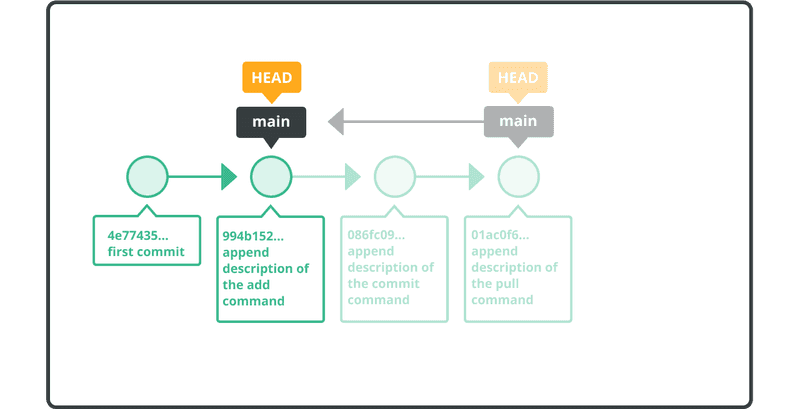
$ git reset --hard HEAD~~
  HEAD is now at 326fc9f append description of the add command
Файл sample.txt больше не будет содержать последние две строки (т. е. «commit: Save the status of an index» и «pull: Obtain the content of the remote repository»).
Убедитесь, что эти фиксации больше не находятся в журнале, с помощью команды git log.
$ git log
  commit 326fc9f70d022afdd31b0072dbbae003783d77ed
  Author: yourname <yourname@yourmail.com>
  Date:   Mon Jul 16 23:17:56 2022 +0900

      append description of the add command

  commit 48eec1ddf73a7fb508ef664efd6b3d873631742f
  Author: yourname <yourname@yourmail.com>
  Date:   Mon Jul 16 23:16:14 2022 +0900

      first commit
ORIG_HEAD указывает на исходную фиксацию до сброса. Это пригодится, если вы случайно выполните сброс.
Вы можете восстановить предыдущий журнал, выполнив сброс в ORIG_HEAD.
$ git reset --hard ORIG_HEAD
  HEAD is now at 0d4a808 append description of the pull command