Ever wondered how to make a mind map that actually helps you get your ideas in order? Making a mind map is a simple yet powerful way to organize your thoughts, visualize connections, and brainstorm more effectively.
Instead of staring at a blank page or juggling scattered notes, a mind map lets you see everything at a glance—from big-picture concepts to smaller details—making it easier to plan, problem-solve, or just clear your mental clutter.
In this article, we’ll guide you step by step on how to make a mind map that works for you. From choosing a central idea and branching out with supporting concepts to adding colors, icons, and even digital tools, we’ll cover techniques to make your mind map both functional and fun.
Whether you’re planning a project, studying for an exam, or simply trying to untangle a jumble of thoughts, this guide will help you turn a chaotic mix of ideas into a clear, organized visual plan.
By the end, you’ll not only know how to make a mind map, but also how to use it as a creative and practical tool to think smarter, stay organized, and spark new ideas. Let’s dive in!
What is a mind map?
A mind map (aka spider diagram) is a visual way to present ideas. It helps with structuring and organizing information. It can also help you analyze, recall, and generate ideas. Best of all? It’s really simple.
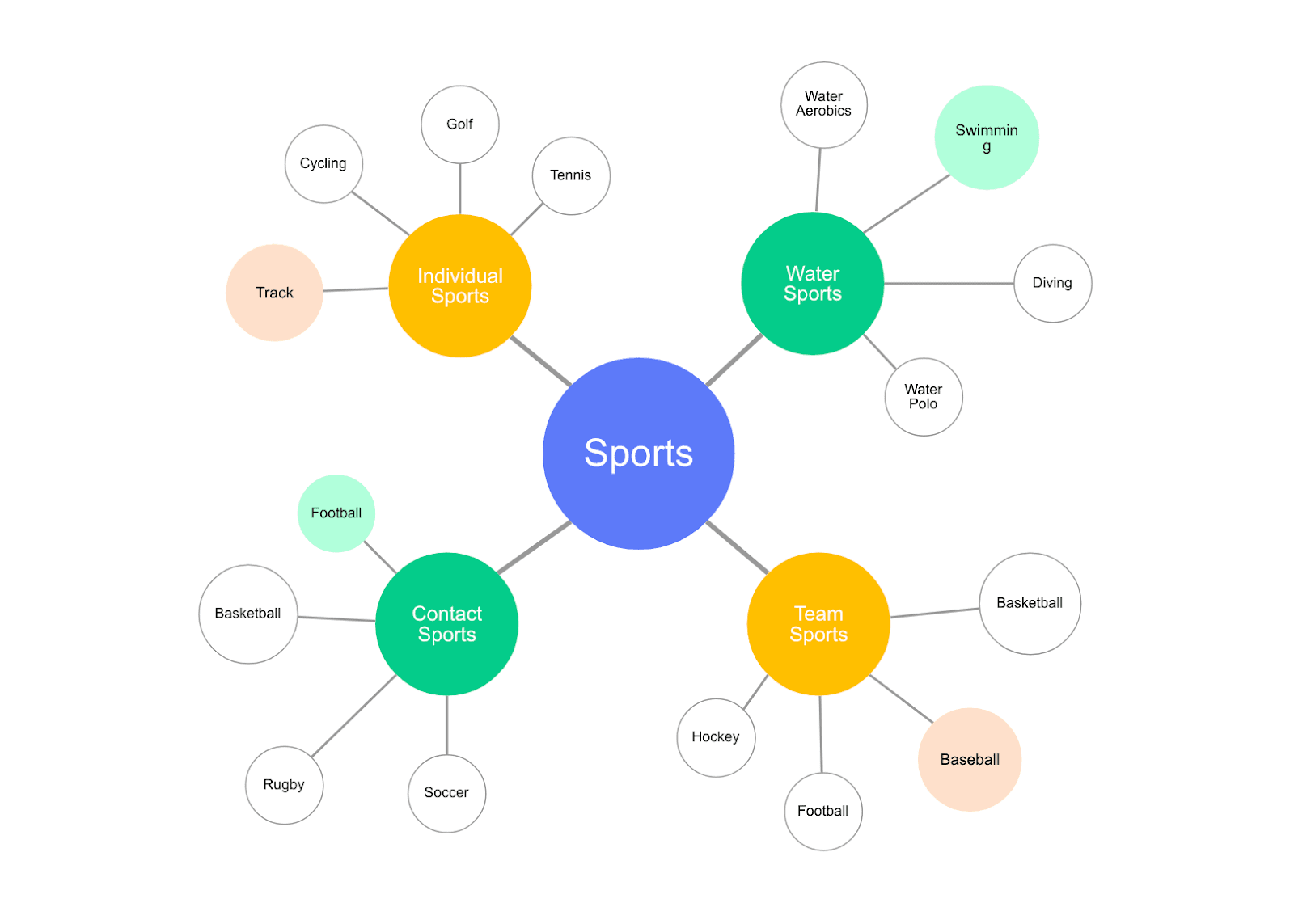
It involves writing down a central theme (which sits in the middle of your diagram), then adding new, related subtopics and ideas, which span out from the center. Those subtopics then have their own ideas branching out — just like in the example below.
The key features of a mind map
Colors and shapes may vary, but there are three key elements that all mind maps have in common.
- There’s a central idea in the middle
- Each branch comprises a keyword
- The branches all connect to the central theme (either directly or indirectly)
The benefits of mind mapping
Mind maps are popular — and for good reason. They’re simple, versatile, and can be a game-changer for organizing your thoughts. Whether you’re a student trying to study for exams, a project manager juggling multiple tasks, or someone who claims they’re “not creative,” mind maps can help you see connections, spark ideas, and make complex information easier to digest.
1. Easy to create
You don’t need fancy software or special training to start a mind map. All it takes is a pen and paper (or a digital tool if you prefer). For example, when planning a marketing campaign, you can put “Campaign” in the center and branch out to ideas like “Target Audience,” “Content Ideas,” and “Budget,” instantly giving structure to what might otherwise feel overwhelming.
2. Easy to understand
Mind maps are intuitive, so anyone can grasp the structure quickly. Even team members who weren’t part of a brainstorming session can look at a mind map and immediately understand priorities, responsibilities, and how everything connects.
3. Aid comprehension and recall
Visual learners especially benefit from mind maps, which combine words, colors, and spatial organization. A student studying biology, for example, can map out the human body systems using different colors for each, making it easier to recall during exams and see how everything interacts.
4. Spark creativity
Mind maps encourage free thinking and unexpected connections. A UX designer brainstorming app features might link “User Needs” to “Interface Ideas” and then to “Gamification Options,” helping uncover creative solutions that might not have come up in a linear list.
5. Help you organize complex data
By grouping related concepts under clear branches, mind maps make complexity manageable. A product manager planning a software release can branch into “Features,” “Dependencies,” “Deadlines,” and “Team Members,” keeping the entire project organized at a glance.
6. Help with problem-solving
Mind maps are a visual way to explore solutions and spot gaps. For instance, a business team facing declining sales can map out “Causes” like marketing strategy or customer feedback, alongside potential solutions, which makes it easier to identify the best course of action.
How to create a mind map: 5 easy steps
Mind mapping is a simple way to get your ideas out of your head and onto a visual map — and Cacoo makes it even easier. Let’s walk through how to create a mind map from scratch, step by step, so you can organize your thoughts, spark creativity, and collaborate with your team.
Step 1: Start with your central idea
Every mind map needs a core idea to anchor everything else. Think of it as the “heart” of your map. For example, if you’re brainstorming new features for a travel app, you might start with “Travel App New Features” in the center.
In Cacoo, you can grab a mind map template and drop your central idea right in the middle. The best part? You can invite your team to the same board and brainstorm together in real time, so everyone can add ideas, no matter where they are.
Step 2: Add your main branches and sub-branches
Next, think about the main topics connected to your central idea. These become your main branches. For a travel app, branches might include “Interactive Map,” “Trip Planner,” “Language Translator,” and “Local Recommendations.”
From there, add sub-branches for more detailed ideas. For example, under “Trip Planner,” you could include sub-branches like “Itinerary Builder” or “Budget Tracker.” Keep labels short and clear — keywords work best. This makes your map easier to read and remember.
Pro tip: Cacoo makes this easy with drag-and-drop branches and flexible templates. You can start simple with a bubble map or go detailed with a hierarchical or flowchart style if you have lots of ideas to organize.
Step 3: Connect your ideas
A mind map isn’t just a bunch of branches — it’s about showing relationships. Use lines or arrows to connect ideas that relate to each other. Maybe your “Interactive Map” branch links to “Local Recommendations” because the map shows nearby attractions.
Pro tip: Cacoo helps keep your connections neat with auto-alignment and easy-to-draw connectors, so your map grows in an organized way as you brainstorm.
Step 4: Add color to organize
Color isn’t just for fun — it helps you process and remember information. Assign different colors to branches or categories so you can quickly identify topics. For example, blue for technical features, green for user experience, and orange for marketing ideas.
Pro tip: Cacoo gives you plenty of color options, so you can create a palette that makes your map easy to scan and visually appealing.
Step 5: Bring your map to life with visuals
Finally, add shapes, icons, or emojis to highlight important ideas or make connections stand out. Visual elements help your brain remember details and make collaboration more engaging, especially with team members in different locations.
Pro tip: In Cacoo, you can drop stickers, shapes, and comments directly onto branches. It’s a fun way to add context, leave feedback, or emphasize key points as your ideas evolve.

Bonus tip: Keep things short and sweet
Mind maps are all about getting ideas out and onto the page — add too much detail, and you’ll get bogged down in the minutiae. Keep labels to a single word or two. You’ll be tempted to write more — but resist! Look for ways to distil that sentence down into a word, figure, or drawing. Your brain will thank you for it later! (As will any colleagues who have to read your diagram later.)
How to use mind maps
Mind mapping can be applied to all sorts of tasks. Here are three ways to use one.
1. Note-taking
Whether you’re in a meeting or in class, mind mapping is a great tool for visual thinkers. The finished product is especially useful for recollection or revision because you’ll have grouped ideas while taking them down.
2. Brainstorming and creative thinking
Need to come up with lots of ideas? Mind mapping is a great way to spark thoughts and organize them coherently. Try mind-mapping in your next brainstorming session to encourage creative thinking and inspire team members.
3. Problem-solving, organizing, and consolidating information
Mind maps can be helpful when sorting through complex information from different sources. Grouping things together can help the viewer spot patterns and links, while simplifying the amount of information the viewer has to process.
4. Studying and memorization
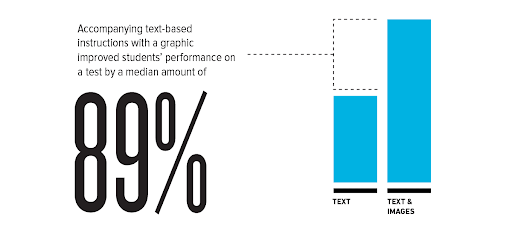
Mind maps are visual, and images can help with memorization. Ruth Colvin Clark and Richard E. Mayer wrote in their book e-Learning and the Science of Instruction that adding images to text-based instructions improved students’ performance on a test by an average of 89%. Meanwhile, students who had scored less than 40% after reading a text comprised of words alone improved to around 65% when words were combined with images.
“Unless our words, concepts, ideas are hooked onto an image, they will go in one ear, sail through the brain, and go out the other ear. Words are processed by our short-term memory where we can only retain about seven bits of information (plus or minus 2) […]. Images, on the other hand, go directly into long-term memory where they are indelibly etched,” says Dr. Lynell Burmark, an education consultant who writes and speaks about visual literacy.
Color can play a strong role in memory too. One study found that there was a big improvement in memory recognition when participants were presented with color images vs. monochrome images.
Final thoughts
The beauty of mind maps lies in their simplicity. They can be used in almost any situation where organization, clarification, and idea generation is needed — whether that’s coming up with ideas for a company name, taking lecture notes, or brainstorming blog post ideas.
If you’re using your mind map in a business or professional context, then you’ll need to put some thought into the format. Pen and paper are fine, but you can’t edit it easily, it’s hard to share, and not everyone will be able to make sense of your handwriting.
This is where mind mapping software comes in handy. Rather than scribbling things down then taking a pic on your phone and sending it out to everyone, you can grab a premade mind map template, populate it (adding colors, images, and shapes at the click of a button), then share it with everyone when you’re done.
With Cacoo, our own tool, you can invite others to join in, add comments and ideas, reorganize, and share it with anyone else who needs to see it. And when the project has finished, you can archive it then refer to it the next time you’re in need of a little inspiration — meaning no good idea goes to waste.
This post was originally published on June 4, 2021, and updated most recently on October 22, 2025.
About Author

Georgina Guthrie
Guest authorGeorgina is a displaced Brit currently working in France as a freelance copywriter. Before moving to sunnier climates, she worked as a B2B agency writer in Bristol, England, which is also where she was born. In her spare time, she enjoys old films and cooking (badly).