With so many project management tools on the market, choosing the right one can feel overwhelming. Everywhere you look, you’ll find platforms promising better collaboration, smoother workflows, and happier teams. On the surface, many of them look almost identical. That’s especially true when comparing Wrike vs Asana. Both aim to bring order to your projects, keep communication clear, and help everyone stay on track; however, once you dig in, you’ll see how different each platform’s approach is.
Asana’s intuitive setup and simple workflows make it ideal for smaller teams or anyone who just wants to get up and running without a steep learning curve. On the other hand, Wrike’s deeper customization and scalable features make it better for bigger teams.
While either tool can boost productivity and help your team stay aligned, the “better” choice really depends on what you value most: simplicity or configurability.
In this guide, we’ll walk through how Asana and Wrike differ, where they overlap, and which one might be the stronger match for your team’s size, workflow, and long-term needs.
What is Asana?
Asana was founded in 2008 by Facebook co-founders Dustin Moskovitz and Justin Rosenstein. Built using Facebook’s internal task management system, the goal was to create software for team collaboration that anyone could use.
Using Asana, you can assign tasks, track progress, share files, communicate with team members, and track deadlines and goals. It also offers an array of templates and automation features.
Asana’s free plan, which supports up to 2 users and unlimited tasks, is suitable if you want to manage personal projects, to-dos, or side projects without paying for a subscription. Bigger teams can purchase the Starter plan for $13.49 per user per month, which removes all user limits.
What is Wrike?
Wrike was launched in 2006 by Andrew Filev, with a mission to build a flexible, fast, and scalable work management platform that could adapt to teams of any size.
With Wrike, you can build detailed project plans, assign tasks, create custom workflows, visualize work with multiple views (Gantt charts, boards, calendars), collaborate in real time, and centralize feedback through features like proofing and approvals. Its automation engine and advanced workspace customization make it useful for teams with complex processes.
The free plan works well for small teams of up to 15 people who just need a simple, organized way to keep tasks and projects on track. For bigger teams and more features, the Business plan covers up to 200 users and adds project blueprints, approvals, extra automations, and file and video proofing — better if you need more structure and control over your workflows.
Features: Asana vs Wrike
Asana and Wrike may seem similar at first glance, but each platform takes a different approach to helping teams plan, track, and deliver work. Let’s break down the standout features of each tool to help you understand which one aligns best with your team’s needs.
Ease of use
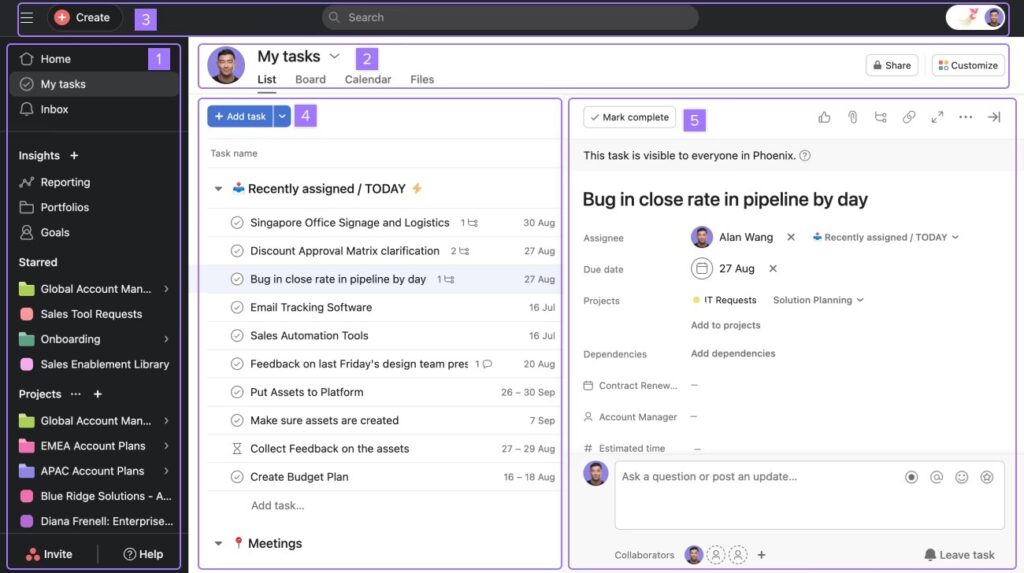
Asana’s clean layout, simple task structure, and intuitive navigation make it easy for teams to get started quickly. Even if you’re new to project management software, it doesn’t take long to understand how everything works. The tradeoff is that this simplicity can limit how deeply you can customize your workflows.
Wrike takes a more robust approach. It offers extensive customization options, advanced views, and powerful configuration tools, which are great for teams with complex processes. However, this also means the learning curve is steep, and it can take a bit more time to get fully comfortable with the interface and features.
User interface
Asana’s intuitive interface makes it popular for teams that are just getting started with project management software. Tasks, subtasks, and projects can be organized quickly using simple drag-and-drop actions, and the overall layout feels familiar and straightforward, so new users rarely need much training or guidance.
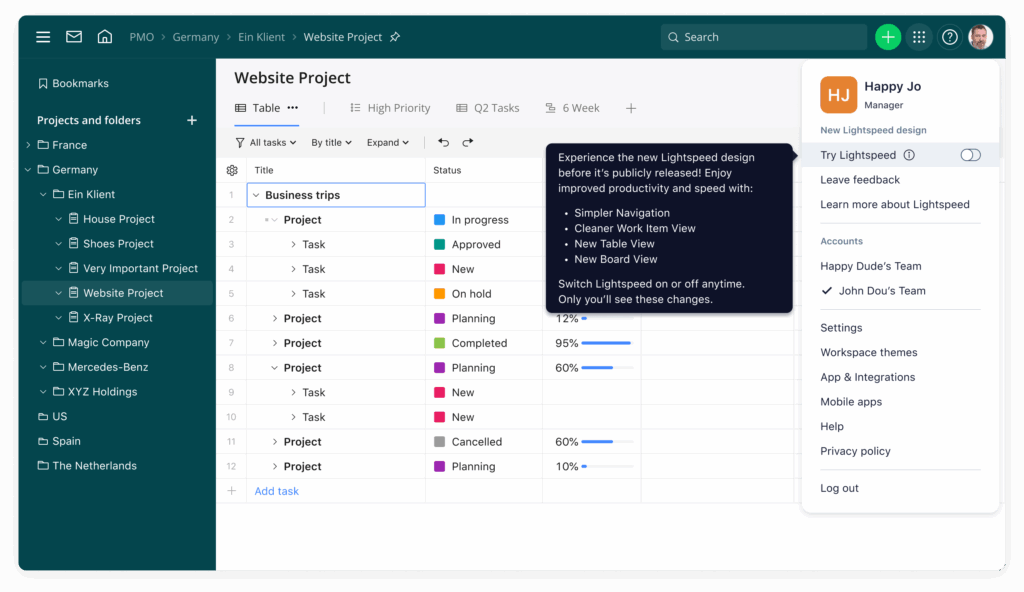
Wrike, on the other hand, has a more complex interface designed for teams that want greater control over how they manage projects. Its dashboards are highly customizable, letting you track tasks, timelines, and workloads in multiple ways, but that flexibility comes with a steeper learning curve.
It can take time to explore all the features, set up the dashboards in a way that fits your workflow, and get comfortable with the different views and reporting options. For teams with more experience in project management or those handling complex projects, Wrike’s interface offers powerful tools, but it requires a bit of patience to master.
Onboarding
Asana keeps onboarding simple and approachable, with interactive tutorials, guided steps, and tooltips that walk teams through the basics of creating projects, assigning tasks, and setting up workflows. Most users can get started right away without feeling overwhelmed, making it ideal for smaller teams or those new to project management software.
Wrike, in contrast, offers a more in-depth onboarding experience. Alongside interactive guides, it provides detailed documentation, best-practice resources, and dedicated support to help teams build out more complex workflows, dashboards, and project structures. While this means Wrike can be more powerful in the long run, it also requires a bit more time and attention upfront to get fully comfortable with all the options.
Setup
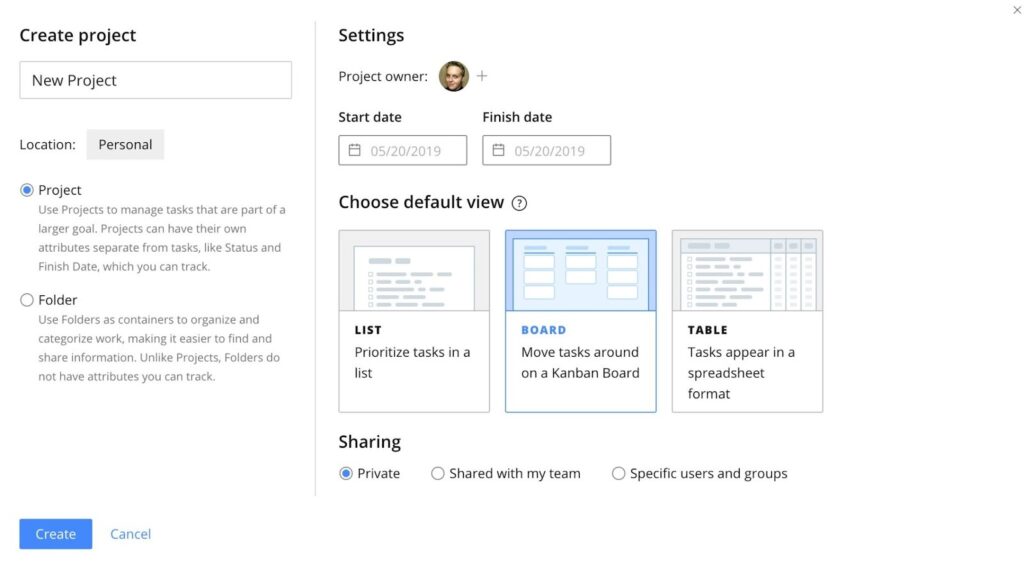
Setting up Asana is quick and straightforward. Whether you’re a small team or a larger group, you can create projects, add tasks, and start working almost immediately. Its intuitive interface and pre-built templates make it easy to organize work without much planning, which is perfect for teams that want to get up and running fast.
Wrike’s setup, on the other hand, takes more time, especially for teams that want to leverage its advanced customization options. Creating custom dashboards, setting up task dependencies, and tailoring workflows to fit complex projects requires more initial configuration. The extra effort pays off for teams that need robust project management capabilities, but it’s not as plug-and-play as Asana.
Support
Wrike gives teams far more flexibility and hands-on support than Asana, offering multiple ways to get help — including phone support, live chat, and web requests — plus 24/5 coverage on all paid plans and optional premium packages with weekend access and an on-demand phone line.
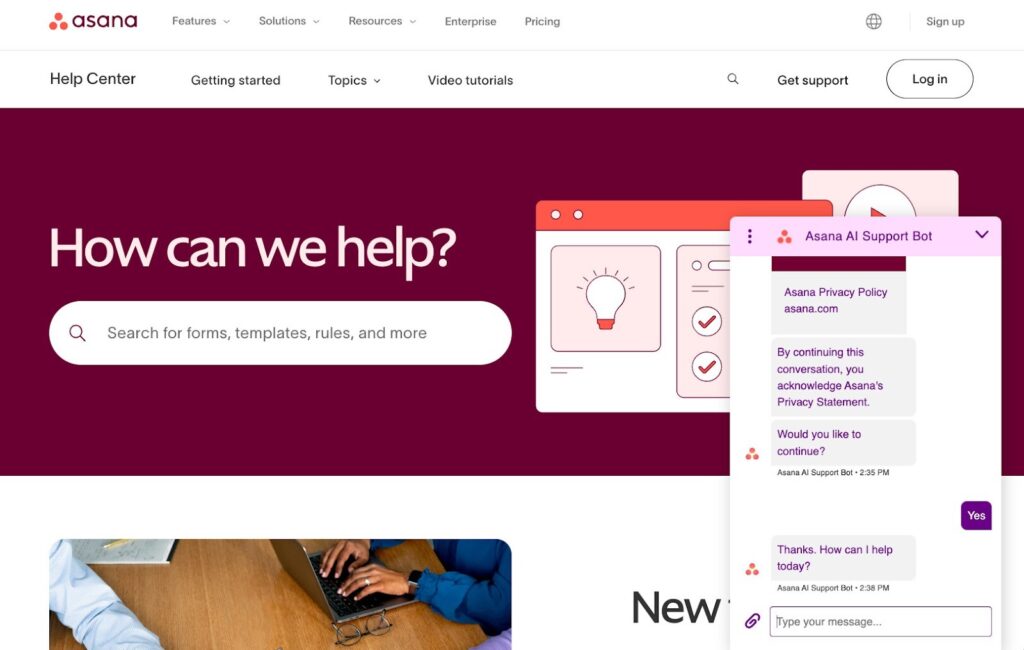
It also provides a rich knowledge base with tutorials, videos, release notes, community forums, and monthly webinars, all accessible through the help center or the Wrike Assistant. Asana, meanwhile, leans heavily on self-service resources and a chatbot, with no way to speak directly to a live support agent, which can be limiting when you need immediate help.
Task and workflow management
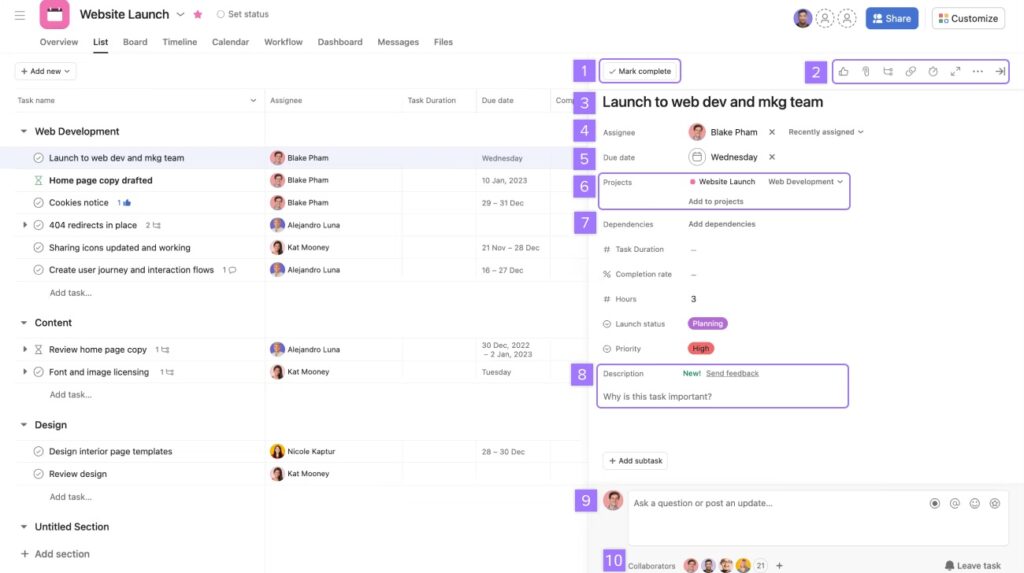
When it comes to task and workflow management, Asana and Wrike cover a lot of the same ground — subtasks, dependencies, recurring tasks, notifications, all the usual essentials. But Wrike is the winner here, offering more flexibility with over 15 project views and the option to assign the same task to multiple people at once. That said, if your team just needs straightforward project management features without all the extra customization, Asana’s toolkit will more than get the job done.
Reporting and analytics
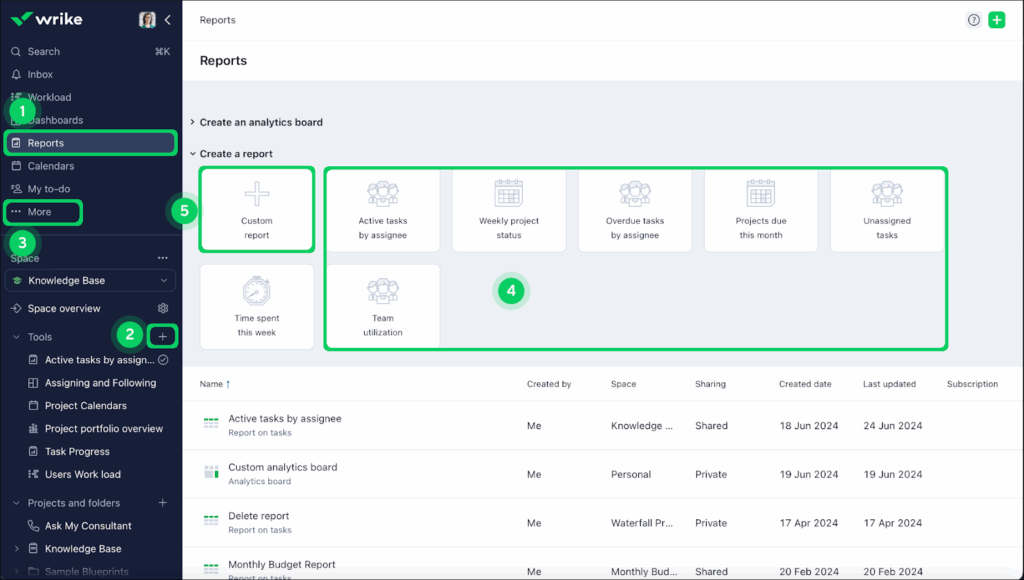
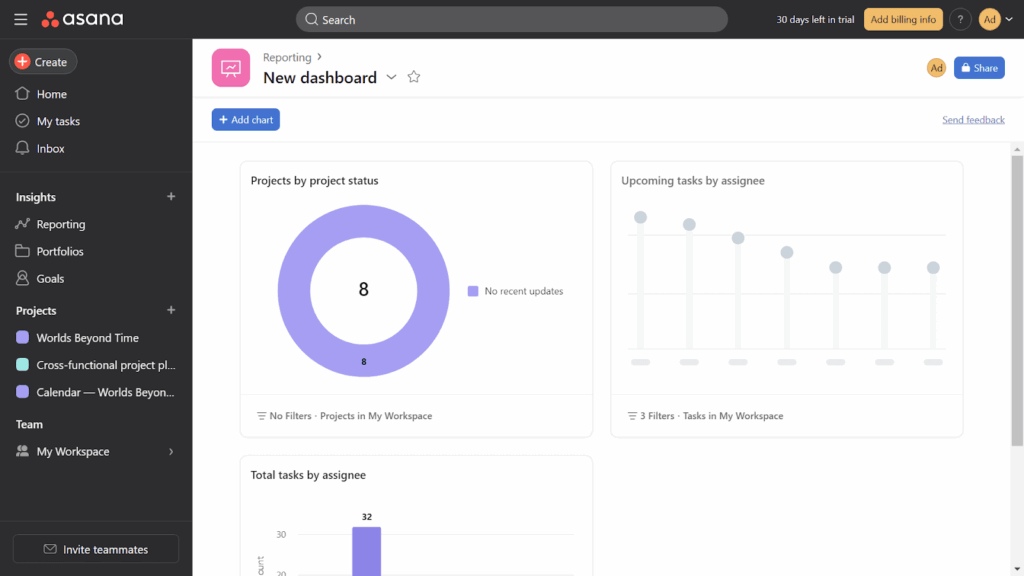
Wrike offers more solutions than Asana when it comes to reporting. Its customizable reports, automatic updates, and templates like weekly project status or team utilization give teams a flexible way to track progress and share insights, though some features are reserved for higher-tier plans. Asana’s reporting is simpler — dashboards display basic metrics, such as tasks completed or project totals, with a few chart options — which is suitable for small teams or internal projects. However, it can feel limited for agencies or larger organizations handling multiple clients or complex workflows.
Automations
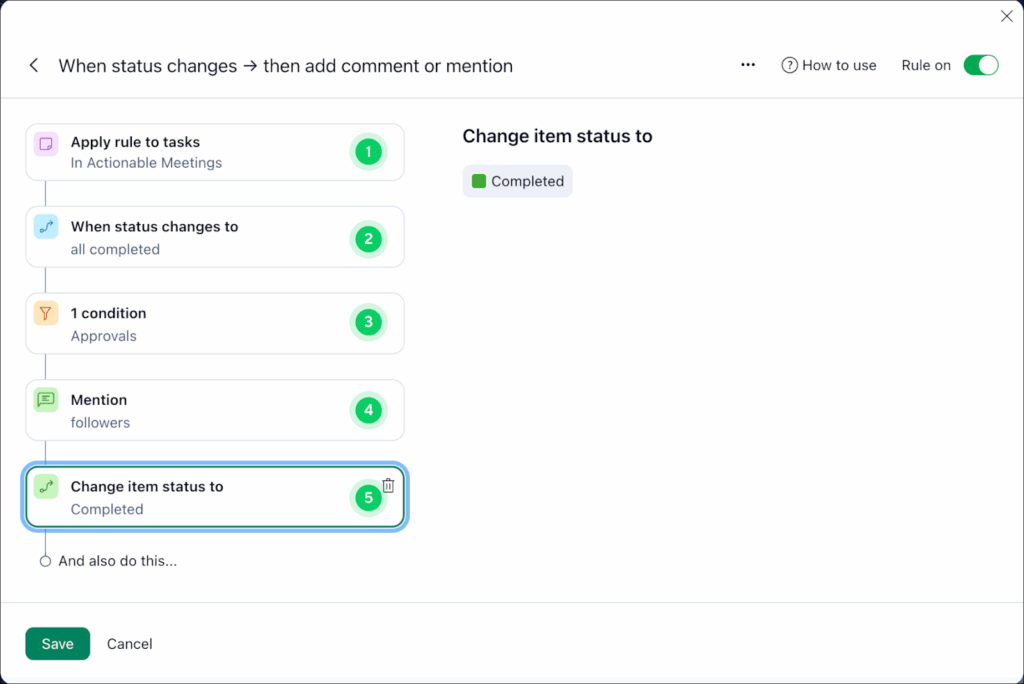
Automations help teams cut down on repetitive work and stay on track. For example, a marketing team could set up an automation that automatically moves a task to “Review” and notifies the manager whenever a draft is marked complete, saving time and ensuring nothing slips through the cracks.
Both Wrike and Asana let you set up no-code automations. Asana has a library of ready-to-go templates, while Wrike uses generative AI to suggest automations for you. Unlike Wrike, Asana uses a single monthly pool of automations shared across all users. This works well for smaller teams, but larger teams on the lower-tier plans can quickly hit the 250-automation monthly limit.
Integrations
Wrike takes the lead in this category, with more than 400 integrations compared to Asana’s 200+, giving teams more ways to connect their tools. Just keep in mind that some integrations on both platforms are locked behind higher-tier plans, so you might need to upgrade to get the ones you want.
While Asana doesn’t have as many integrations as Wrike, its 200+ connectors cover all the essentials. You can link it with popular tools like Microsoft 365, Google Workspace, and Slack, and the best part is that many of these integrations are available even on the free plan — more than enough for most teams.
AI
AI is quickly becoming a must-have in project management tools, and both Wrike and Asana use it in ways that genuinely help you work faster. Wrike’s AI is great for the basics: it can clean up your comments, summarize long threads, generate task descriptions, and even help you build simple automations. If you’re creating tasks on the fly or trying to catch up on a busy conversation, Wrike’s AI gives you a nice productivity boost without feeling overwhelming.
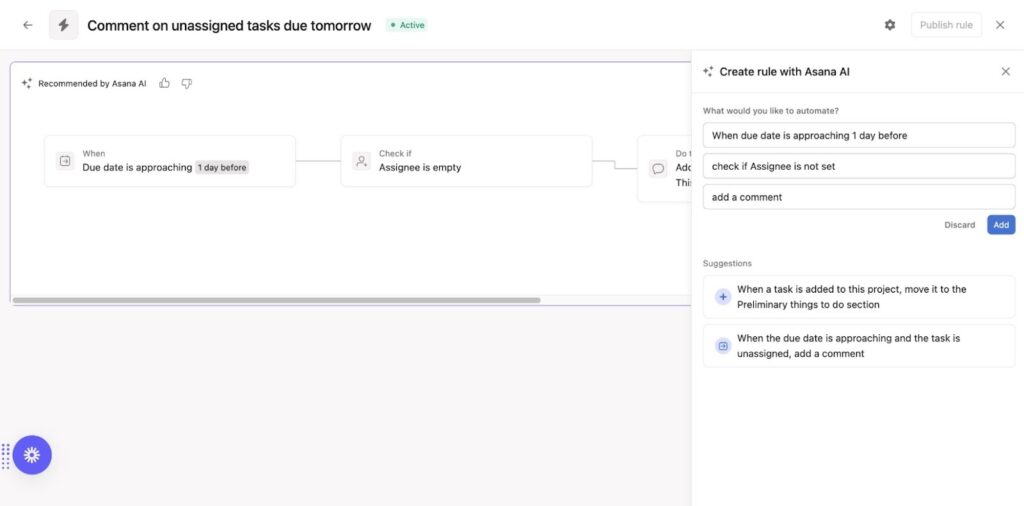
Asana, though, takes things a step further. Its AI shows up in more places throughout the platform, helping you write, organize, analyze, and automate as you move through your day. For example, if you need to build a new project, Smart Projects will build the structure for you based on just a title and description. And if you want to keep your team in sync, Asana AI can draft full status updates by pulling in real-time project data, surfacing risks, and highlighting what needs attention. It even helps you build workflows by suggesting rules or generating them from scratch.
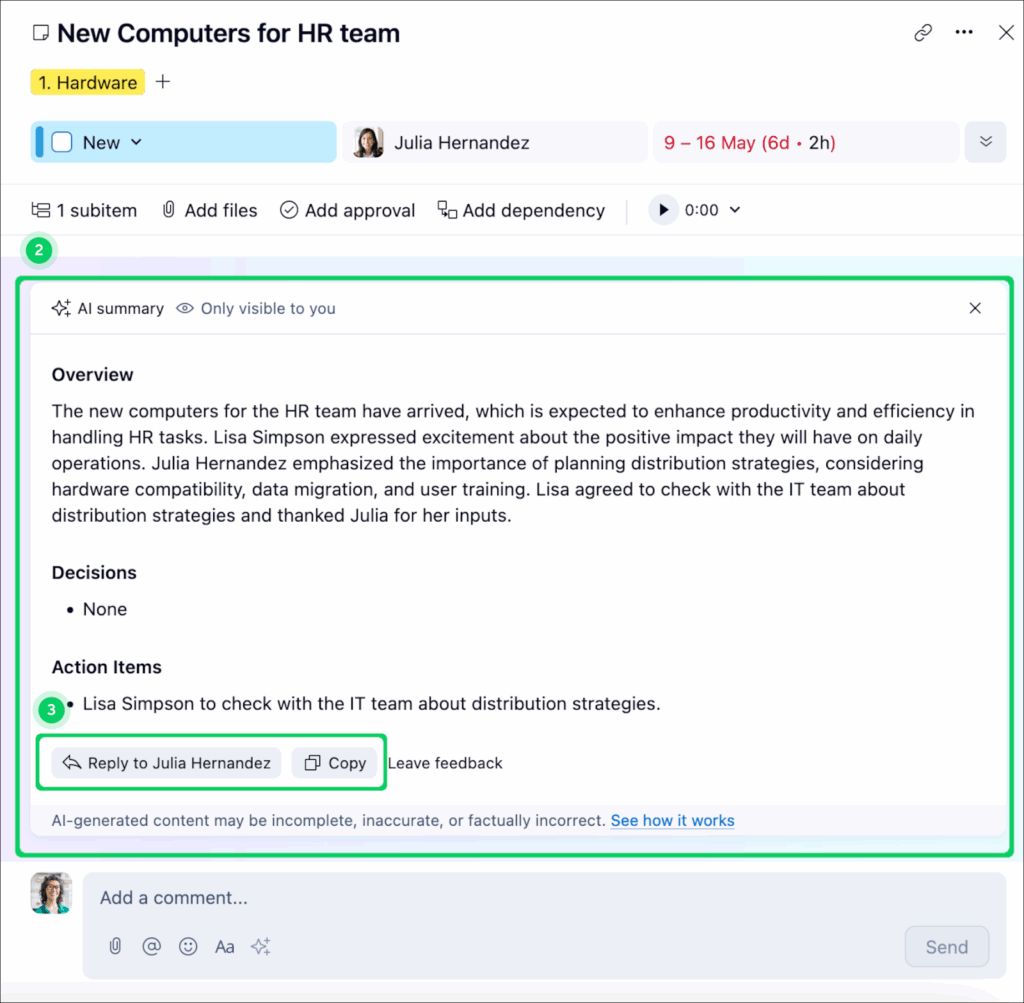
For heavier workloads, Asana’s higher-tier plans unlock AI Studio, which enables you to embed AI agents directly into your processes — handling requests, generating content, and automating more complex tasks. So while Wrike’s AI is helpful, Asana’s feels more integrated, capable, and ready to take real tasks off your plate.
Collaboration
For most small teams, Asana’s collaboration features are more than enough, but Wrike is better suited for teams handling complex projects or needing more advanced editing and proofing capabilities.
Both platforms let users comment on tasks, upload attachments, and manage shared calendars. Wrike pulls slightly ahead with its advanced proofing tool, which supports 30 file types and tracks comments and versions in sidebar panels, and its live editor that allows two people to edit task descriptions simultaneously — perfect for avoiding accidental overwrites on complex projects.
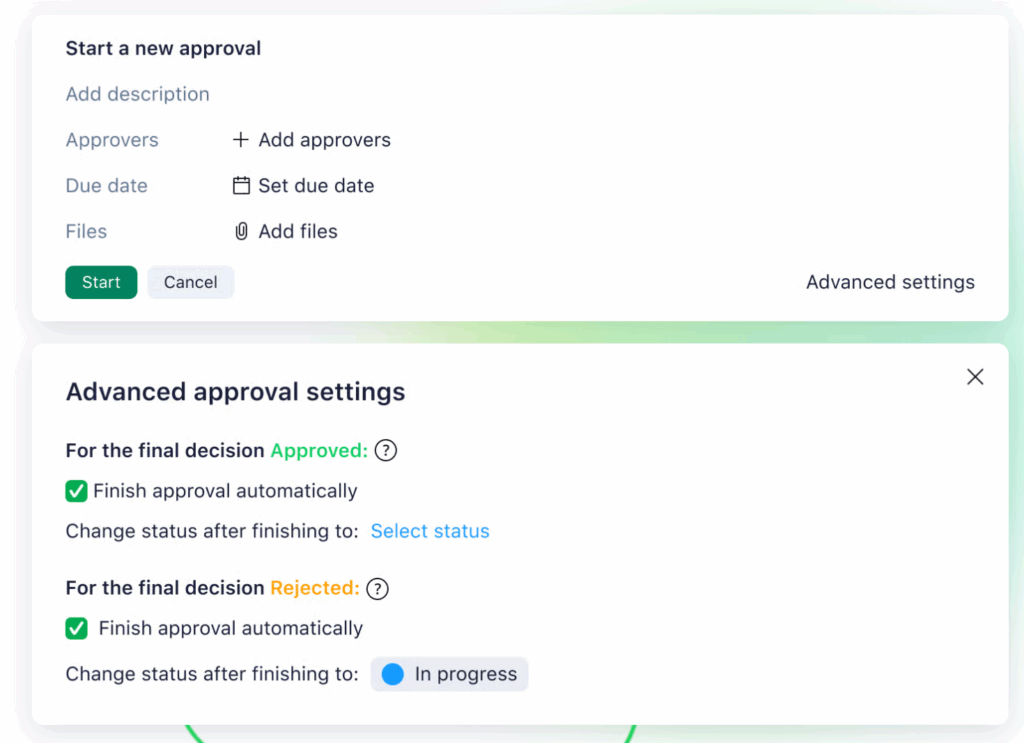
Asana, meanwhile, offers in-app chat messaging, keeping conversations centralized without needing email or Slack. Its proofing tool is more limited, supporting just five file types and turning comments into subtasks, which can get confusing for larger discussions.
Pricing: Wrike vs Asana
When it comes to pricing, Wrike and Asana both offer tiered plans, but the right choice depends on your team size and the features you need. Asana’s free plan is more generous for larger teams, while Wrike gives you more advanced features at higher tiers, which can be appealing if you need flexibility and robust project management tools. Asana is more cost-effective for smaller teams, while Wrike provides robust tools but can become costly as team size grows.
Asana
Asana’s free plan supports up to 10 team members, making it a solid choice for small teams just getting started.
- Basic (Free): Up to 10 users, three views, basic workflows, and reporting.
- Premium ($10.99/user/month): Unlocks custom fields, unlimited dashboards, and unlimited reporting — a great middle-ground for growing teams.
- Business ($24.99/user/month): Adds advanced reporting options and a fourth project view, ideal for larger teams needing more oversight and customization.
- Enterprise: Custom quote.
- Enterprise+: Custom quote.
Wrike
Wrike also offers five pricing tiers, but its structure is a bit different:
- Free ($0): Unlimited seats, but very limited features.
- Team ($10/user/month billed annually, 2–15 users): Adds shared dashboards, real-time collaboration, and basic automations.
- Business ($25/user/month billed annually, 5–200 users): Includes advanced reporting, workflows, and integrations — ideal for complex projects.
- Enterprise: Custom quote.
- Pinnacle: Custom quote.
Pros and cons: Asana vs Wrike
If you’re torn between Asana and Wrike, you’re not alone. Here’s a clear breakdown of the pros and cons of each to help you figure out which tool fits your team’s style and workflow.
Asana pros
- Intuitive interface: Asana is easy to pick up, even for teams who are new to project management software. You can navigate most features without needing training.
- Low learning curve: Teams can get up and running quickly with minimal onboarding, which is ideal for fast-moving or lean teams.
- Clean, minimal workspace: The interface keeps things organized without overwhelming you, which helps teams stay focused.
- Stronger AI: Asana’s AI shows up throughout the platform — helping you create projects, draft updates, summarize work, and build workflows — so you get more hands-on support without extra effort.
- Helpful templates: You can build projects and workflows quickly with pre-built templates and basic automations.
- In-app chat messaging: Asana includes built-in messaging so teams can communicate without relying on Slack or email.
Asana cons
- Tasks can only be assigned to one person: This can make work tricky for multi-owner responsibilities or cross-functional tasks.
- Proofing tool is less advanced: Asana supports only a handful of file types, and comments convert to subtasks, which can feel messy for large reviews.
- No phone option for customer support: You’re limited to help articles or a chatbot, which isn’t ideal if you’re dealing with time-sensitive issues.
- Limited customization for complex workflows: As your processes grow, you may find Asana hitting its ceiling in terms of flexibility. Teams that need multi-step approvals or advanced structures may outgrow it.
- Basic reporting capabilities: The dashboards give you simple metrics but lack deeper analytics or dynamic reports. Larger teams or client-facing roles often need more detail than Asana provides.
- Automation limits on lower plans: The 250-automation monthly pool is shared across the entire workspace and gets used up quickly by larger or more active teams. You may end up needing a higher-tier plan sooner than expected.
Wrike pros
- Highly customizable workflows: Wrike allows you to build workflows, custom fields, and processes that match exactly how your team operates. This makes it a strong fit for complex or multi-stage projects.
- Advanced project views: With more than 15 views, including Gantt charts and workload views, Wrike gives you deep visibility into timelines and team capacity. It’s ideal for detailed planning and ongoing project oversight.
- Robust reporting tools: Wrike’s reporting is powerful, letting you create dynamic, automated reports that update in real time. Teams that rely on data will appreciate the depth here.
- Stronger collaboration features: Features like advanced proofing for 30 file types and real-time editing make it easy to work together on complex assets. It keeps conversations and feedback centralized.
- Large integration library: With 400+ integrations, Wrike connects to just about any platform you’re using. This flexibility helps streamline workflows across departments.
- Comprehensive onboarding and support: Live chat, phone support, and detailed onboarding resources help teams get the most out of Wrike. It’s especially helpful for large organizations rolling the tool out across many users.
- Scales well with growing teams: Wrike’s structure supports larger teams, more advanced workflows, and cross-functional collaboration. It’s built to grow with you as your work evolves.
Wrike cons
- Steeper learning curve: With more features and customization, Wrike takes longer to learn. New users may need time before they feel comfortable navigating the workspace.
- More setup required: Building dashboards, workflows, and automation rules takes effort upfront. Teams looking for immediate plug-and-play functionality may find this challenging.
- Advanced features require higher-tier plans: Some of the best reporting, integration, and security tools are locked behind more expensive plans. Costs can add up quickly depending on your needs.
- Interface can feel overwhelming: Wrike’s layout has a lot happening at once, which can initially feel cluttered or complex. Teams that prefer a minimalist design may find it visually heavy.
Which is better: Wrike or Asana?
Choosing between Wrike and Asana largely depends on your team’s size, workflow complexity, and what you value in a project management tool. Asana stands out for teams that want something intuitive and easy to start using right away. Its clean, visually appealing interface makes it simple to track tasks and projects at a glance, while helpful templates and straightforward setup mean onboarding is fast. The free plan also supports smaller teams with up to 10 users and unlimited tasks, making it a strong choice for teams that want efficiency without a steep learning curve.
Wrike, on the other hand, is designed for teams that need more control and flexibility. While it has a steeper learning curve, it offers advanced project views, robust reporting, extensive integrations, and the ability to assign tasks to multiple people. Its collaboration and proofing tools are more sophisticated, which is particularly valuable for complex projects or larger teams. In short, Asana excels for teams who want a visually clear, easy-to-use tool that keeps work organized, while Wrike is ideal for teams that need scalability, deeper customization, and advanced project management features.
What about Backlog?
When it comes to picking the right project management tool, Backlog isn’t just another project management tool — it’s an all-in-one platform where you can plan work, track progress, track bugs, and even handle code management, without needing to juggle multiple tools.
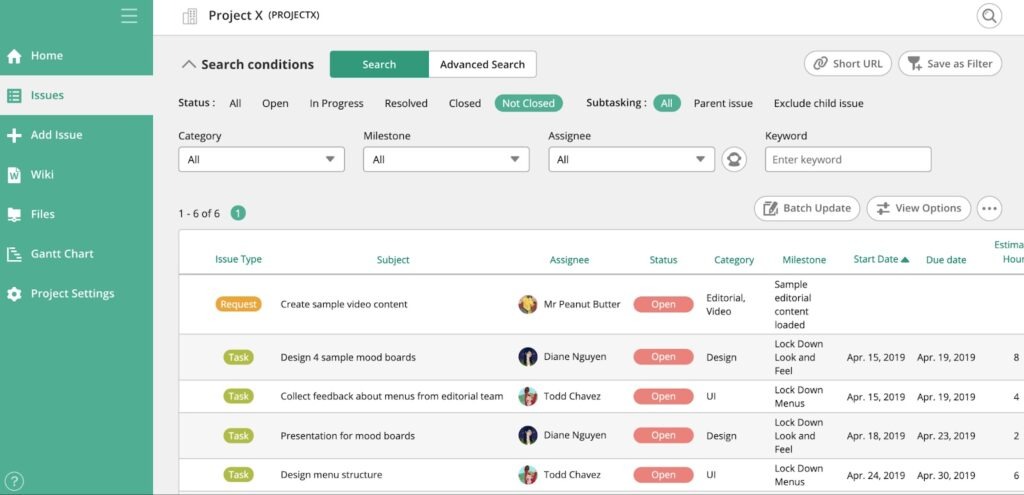
Whether you’re deploying code or managing a complex marketing campaign, Backlog gives you everything you need in one place — something Monday and Asana just can’t quite match. Here’s why Backlog might be the better fit for you:
Bug tracking
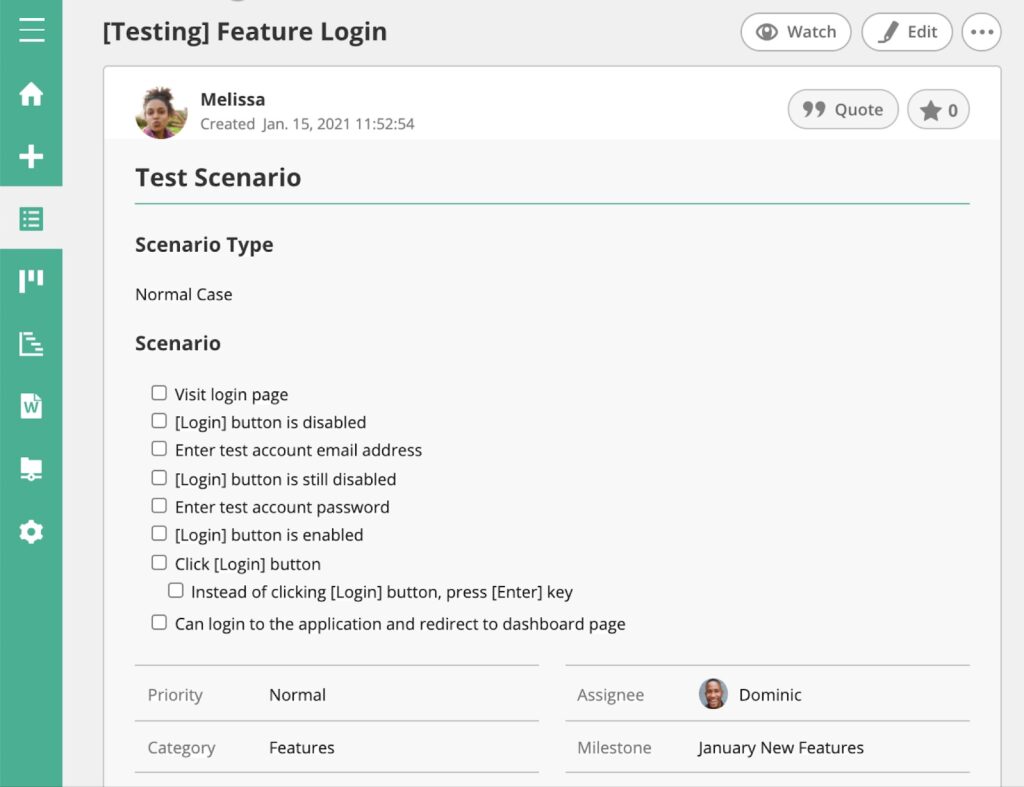
In addition to its robust project management, Backlog provides an all-in-one solution for software developers with its bug tracking features. You can capture every detail with custom workflows, organize tasks with a neat hierarchy, and even set up issue templates to keep things consistent. Plus, the ability to add issues via email and track versions and milestones makes managing your work a breeze.
Say you’re working on a software development project and a critical bug pops up. With Backlog, you can quickly categorize the issue, assign it to the right person, and track its progress all in one place.
Project visualization
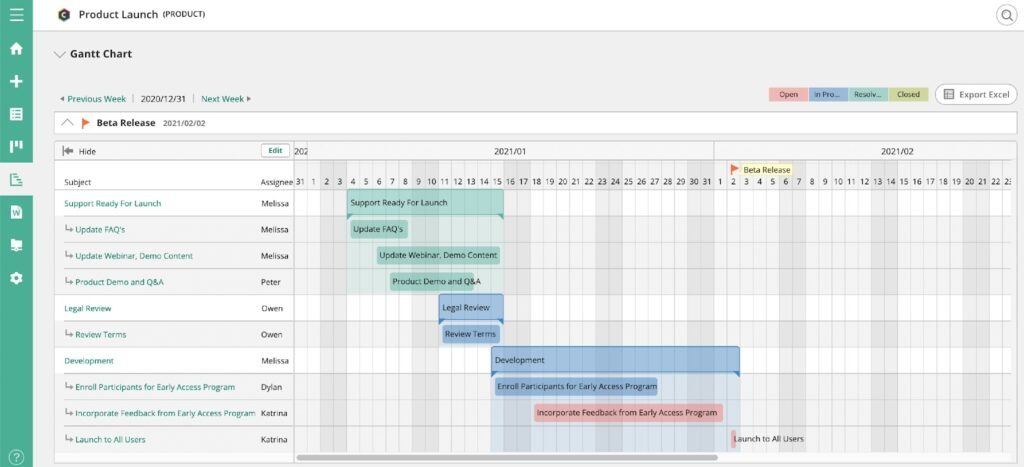
One of the things that makes Backlog stand out is how easy it is to get a clear view of your project. With Gantt charts, you can see your entire project timeline in one glance and make quick edits when things change. Burndown charts are also super handy, giving you a real-time look at what’s left to do and how much time you’ve got left to do it. And with Kanban boards, you can move tasks through your workflow in a way that’s flexible and totally customizable.
If you’re managing a project with multiple teams, Backlog’s Gantt charts let you keep everything on track. You can see how all the tasks fit together, tweak timelines as needed, and make sure everyone’s in sync.
Built-in code management
One of the unique perks of Backlog is that it has Git and SVN repositories built right in. So, if your team does a lot of coding, you can manage your code and project tasks in the same place. You can review code changes, handle merges, and keep your documentation up to date without ever leaving the platform.
For a development team, this integration means no more jumping between different tools. You can track project progress, manage your code, and collaborate with your team all in Backlog.
Customizable workflows
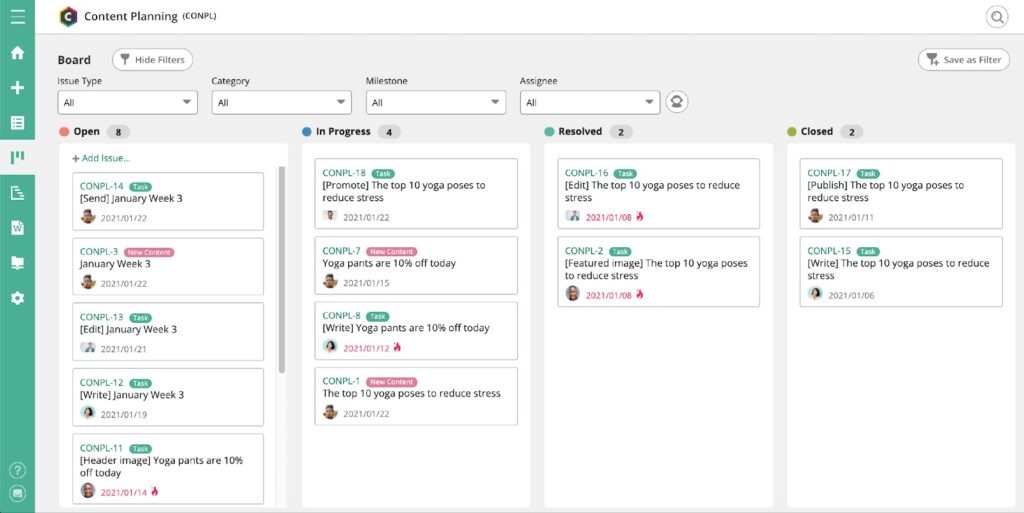
Backlog is also super flexible when it comes to customization. You can create custom fields that fit your team’s specific needs, so the tool works exactly how you want it to. Whether you’re organizing tasks by priority or tracking specific metrics, Backlog lets you set it up your way.
If you’re leading a marketing campaign, you can customize your Backlog workspace to track all the details that matter most — like deadlines, deliverables, and campaign performance.
Easy migration
Switching tools? Backlog makes it easy to move your data from platforms like Jira or Redmine with its Jira and Redmine Importer. This means you can get up and running with Backlog without missing a beat.
If your team is moving from Jira, you can bring all your existing data into Backlog smoothly. That way, you don’t lose any momentum during the transition, which can be a huge headache with other tools.
Seamless diagramming
One of the standout features of Backlog is how effortlessly it integrates with Cacoo, Nulab’s online diagramming tool. This integration allows your team to create and share diagrams directly within your Backlog projects, making it easier to visualize workflows, map out processes, and brainstorm ideas collaboratively.
If your team is working on a product development project, you can use Cacoo to create flowcharts, wireframes, or mind maps, and then attach those diagrams directly to tasks or issues in Backlog. This ensures that everyone stays on the same page and has a clear visual reference to guide their work — something that adds a layer of collaboration you won’t with Monday or Asana.
Strong security features
When it comes to security, Backlog offers strong features to keep your data safe. With IP Address Control, you can manage who gets access to your workspace, ensuring that sensitive information stays protected.
On top of that, Backlog integrates seamlessly with Nulab Pass, which adds an extra layer of security through single sign-on (SSO) and enhanced access controls. This is especially beneficial for teams that need to maintain strict security protocols while working on critical projects. If you’re handling confidential client data, Backlog’s security features, combined with Nulab Pass, ensure that only the right people have access to your workspace.
Final thoughts
Deciding between Wrike and Asana comes down to your team’s size, workflow complexity, and what you value most in a project management tool. Asana is a strong choice for teams that prioritize simplicity, ease of use, and a visually clear interface, making it easy to track tasks and projects at a glance. Wrike, by contrast, is better suited for larger teams or projects that require advanced customization, multiple project views, robust reporting, and more flexible collaboration options.
If you find that neither Asana nor Wrike fully meets your team’s needs, it may be worth considering Backlog. Unlike many other project management platforms, it combines task management, bug tracking, and project visualization with Gantt and Kanban boards all in one place. For development teams, you even have built-in code management, while its integration with Cacoo makes diagramming and collaboration seamless. For teams looking for a tool that adapts to both simple and complex workflows, Backlog is definitely worth a closer look.
About Author

Shelley
Guest authorShelley Mason is a copywriter at Nulab based in New York City.