Combinar y mover un commit
Vaya al directorio git-tutorial/tutorial6 que previamente descargó.
Cuando examine el historial de este repositorio, tendrá el siguiente aspecto:
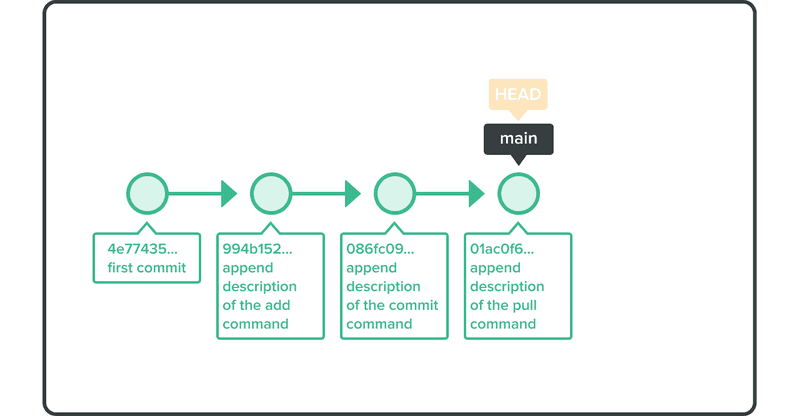
Vamos a modificar el commit con el mensaje "append description of the commit command".
Para hacer eso, usaremos el comando git rebase -i.
$ git rebase -i HEAD~~
Su editor de texto predeterminado se abrirá listando los commits desde HEAD hasta HEAD~~, como se muestra a continuación.
pick 9a54fd4 append description of the commit command
  pick 0d4a808 append description of the pull command

  # Rebase 326fc9f..0d4a808 onto d286baa
  #
  # Commands:
  #  p, pick = use commit
  #  r, reword = use commit, but edit the commit message
  #  e, edit = use commit, but stop for amending
  #  s, squash = use commit, but meld into previous commit
  #  f, fixup = like "squash," but discard this commit log message
  #  x, exec = run command (the rest of the line) using shell
  #
  # If you remove a line here THAT COMMIT WILL BE LOST.
  # However, if you remove everything, the rebase will be aborted.
  #
En la primera línea, cambie la palabra pick por edit, guarde y salga.
Verá la siguiente salida y será retirado de esa confirmación.
Stopped at d286baa... append description of the commit command
  You can amend the commit now, with

          git commit --amend

  Once you are satisfied with your changes, run

          git rebase --continue
Abra el archivo sample.txt y modifíquelo como se indica a continuación.
Anyone can learn Git with this tutorial and Backlog
add: Register a change in an index
commit: Record index state.
pull: Obtain the content of the remote repository
Use el git commit --amend para confirmar el cambio.
$ git add sample.txt
$ git commit --amend
A continuación, ejecute git rebase --continue para completar el proceso de rebase.
$ git rebase --continue
Al ejecutar un rebase en su rama actual, puede encontrarse con conflictos en sus cambios. Para continuar, debes resolver manualmente esos conflictos, y luego ejecutar git add y git rebase --continue. No es necesario emitir nuevos commits para resolver los conflictos.
Sin embargo, si quiere detener el rebasing, puede llamar a git rebase --abort, que revertirá y saldrá de todo el proceso y modificará con éxito el commit.
En los casos en los que especifique edit en más de una línea al llamar a git rebase -i, se le pedirá que modifique cada uno de los commits de uno en uno.